DataCamp pricing currently lists Premium at $13 a month when you choose yearly billing. Teams sits at the same $13 per user a month on yearly billing for groups of two or more. Basic stays free. Enterprise requires a custom quote.
The yearly toggle on the pricing page shows a $78 savings on Premium compared with the higher monthly figure. Full course access, projects, certificates, and guided career tracks only open after you move past the free plan.
A subscription is worth the money when you treat the platform as a structured path rather than occasional sampling. It loses value if you stop after the opening chapters or study in short, irregular bursts.
The decision comes down to how many full courses you expect to finish and whether the certificates or career tracks matter for your goals.
How the Free Basic Plan Fits the Decision
Basic costs nothing. You get the opening chapter of every course, a professional profile, cheat sheets, mobile access, skill assessments, live code-alongs, and competitions.
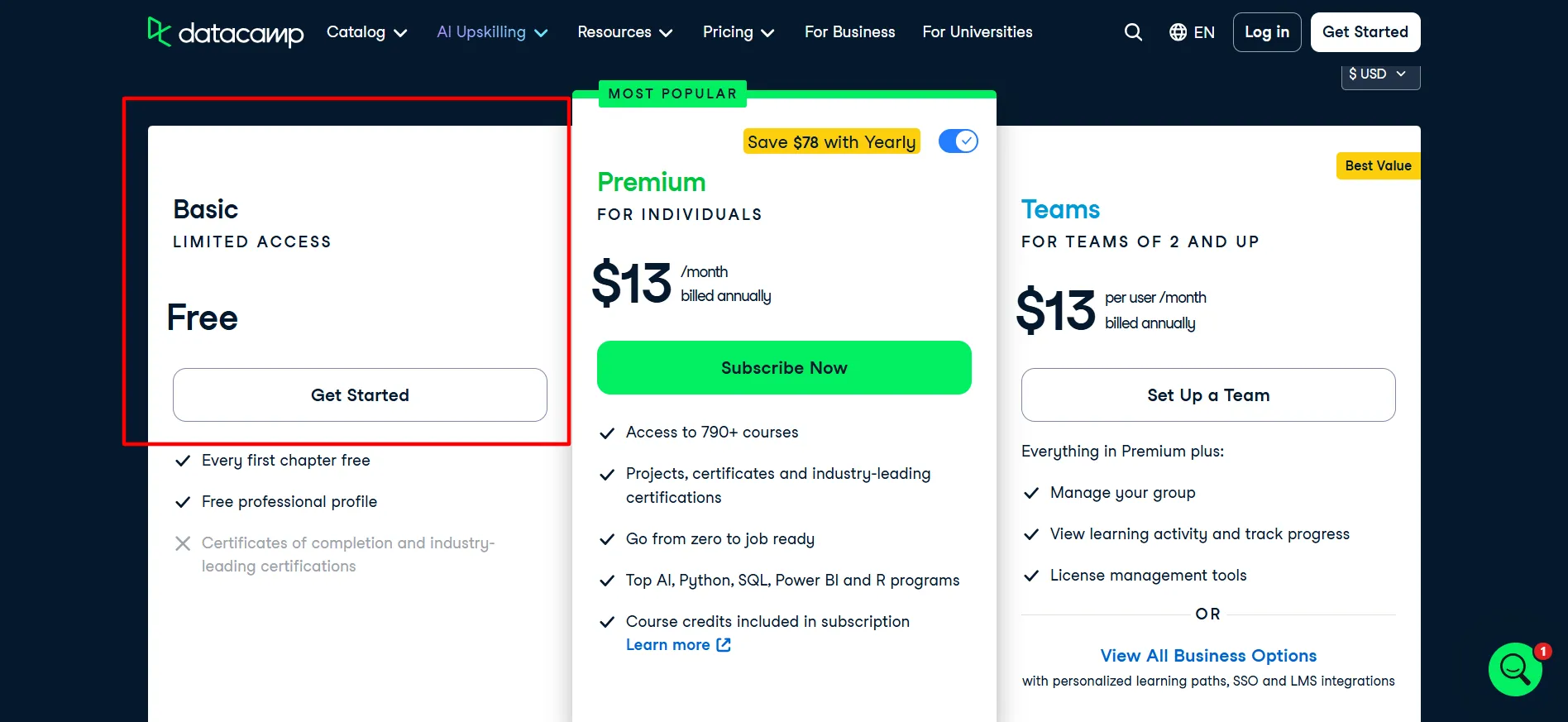
Certificates and full course completion stay locked. Most projects and the guided career tracks also stay behind the paid wall. Practice exercises are limited, so you can test the interactive style but cannot complete the deeper lessons.
This free layer is useful for checking whether the interactive style matches how you learn. You can finish the first lessons in Python, SQL, R, Tableau, or Power BI without entering a card.
Many people use it for a week or two, then decide. If the exercises feel clear and you want to keep going past the first chapter, the free access has done its job. If you only ever finish those opening sections, Basic is already enough and a subscription adds little.
There is no time limit, so you can return months later and still see the same free chapters. The professional profile is available even on the free plan, which some users keep active while they sample topics.
For pure exploration, Basic removes any risk. The moment you want to finish a course or collect a certificate, the free access ends and the paid plans become the only route forward.
Premium at $13 a Month on Yearly Billing
Premium is the individual option shown at $13 a month when billed yearly. The page highlights a $78 yearly saving against the monthly rate.
You unlock the full library of 790+ courses, hands-on projects, course certificates, and industry certifications. Career and skill tracks become available. Everything from Basic carries over, plus priority support and the tools to build a portfolio.
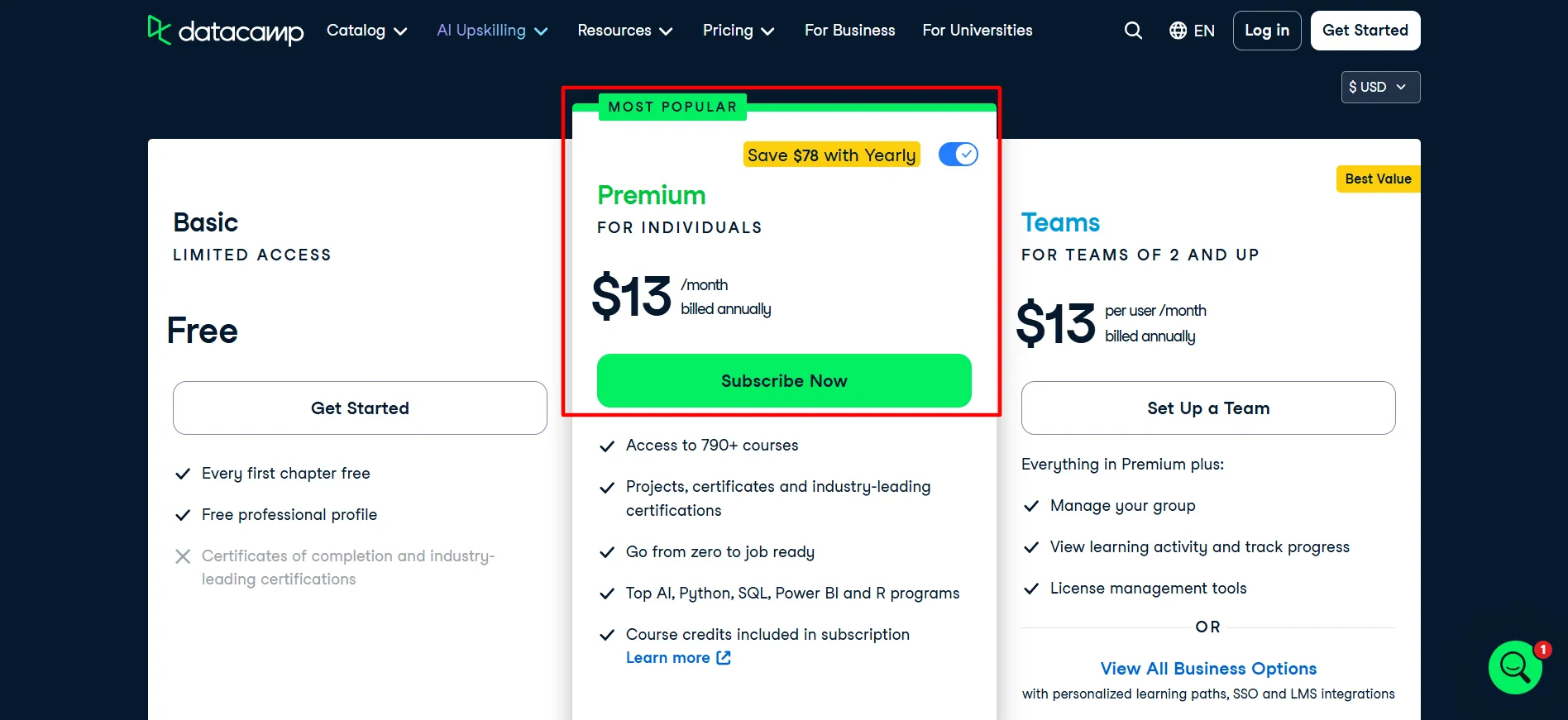
Course credits are included so you can earn additional recognition as you progress. The interactive coding environment stays available for practice beyond the free limits.
This tier is worth the rate for people who plan to work through several courses over six months or longer. The yearly figure is the lower ongoing cost for steady study.
Monthly billing exists but raises the per-month price, which makes it better for short focused sprints rather than long-term learning. It suits career switchers who want a clear sequence in data skills and working professionals who need targeted practice in specific tools.
Learners who finish a meaningful number of courses and collect certificates usually find the yearly rate reasonable. Learners who complete only one or two courses see a higher effective cost per finished course and often regret the commitment.
Sampling the free chapters first removes most of the guesswork. Once you subscribe on yearly billing, the rate stays fixed for the year unless a new promotion appears.
Most individual users who treat DataCamp as their main learning platform end up on this plan because it removes the chapter limits and opens the certificates they can show on a profile or resume.
Teams at $13 per User on Yearly Billing
Teams carries the same $13 per user monthly rate on yearly billing once you have at least two people. Every seat receives the full Premium catalog and certificates. The extra pieces are group management, activity tracking, progress views, license tools, an admin dashboard, and team reports.
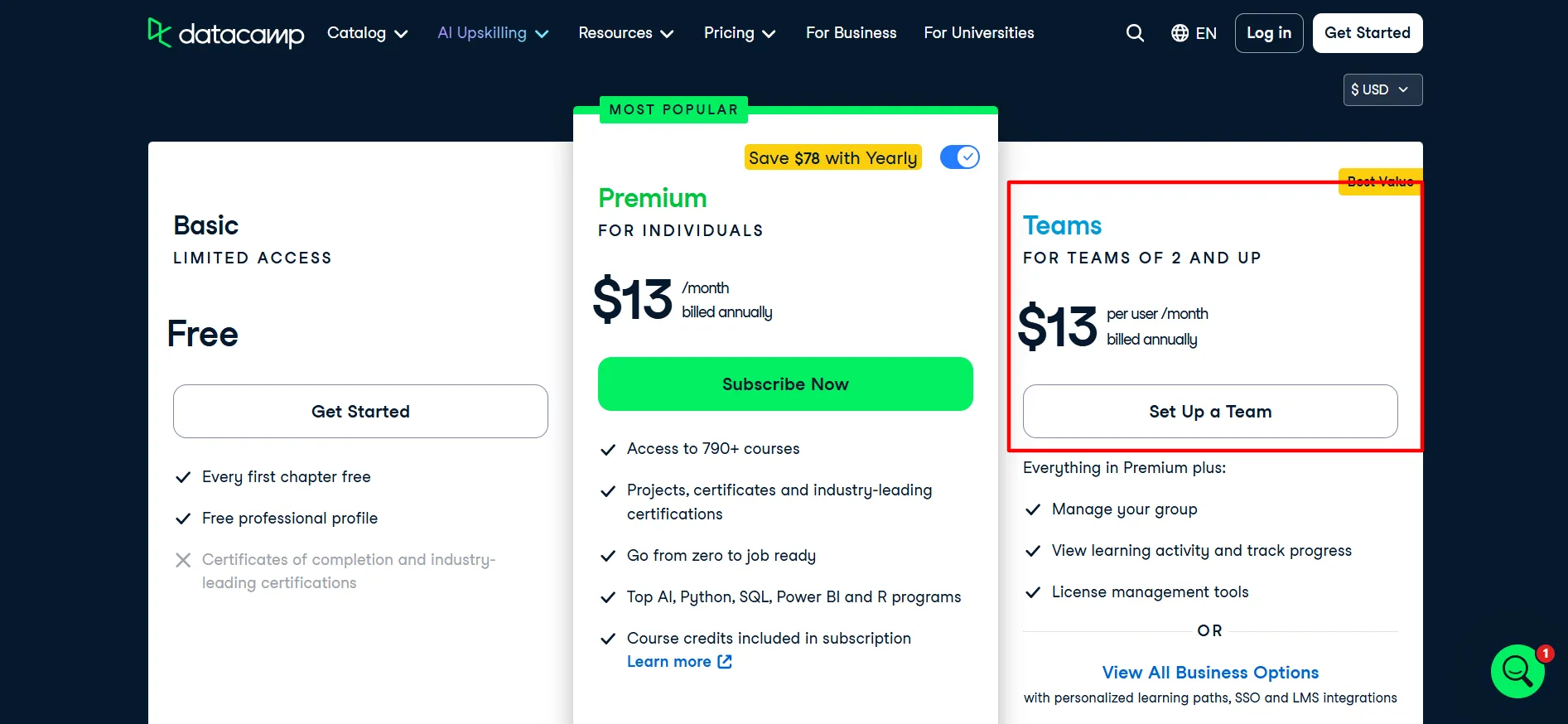
Custom tracks remain off-limits until Enterprise. Admins can assign specific courses or tracks and watch completion rates without logging into each account separately.
Small groups that want shared visibility usually find this rate practical. An admin can assign material and watch completion without juggling separate personal accounts.
The minimum of two seats keeps it simple for startups or small departments. Once the group grows or needs single sign-on and custom pathways, Enterprise becomes the logical next step.
For two to ten people who mainly need the catalog plus basic tracking, the per-user yearly figure is typically the cleanest option. The cost scales directly with the number of seats, so a three-person team pays three times the individual Premium rate while gaining the shared dashboard.
Most small teams that already know they will study together choose Teams over separate personal accounts because the tracking tools save time on follow-up.
If the team only needs the catalog and does not care about reporting, multiple Premium seats can be cheaper to manage, but the shared view is the main reason Teams exists.
Enterprise and Student Options
Enterprise is quoted individually. It layers personalized pathways, Google and Microsoft SSO, Skill Matrix, SAML SSO, LMS connections, custom report templates, co-branded pages, and the ability to build your own tracks on top of the Teams features.
Larger organizations that require those controls request a quote. Most individuals and small teams never reach this level.
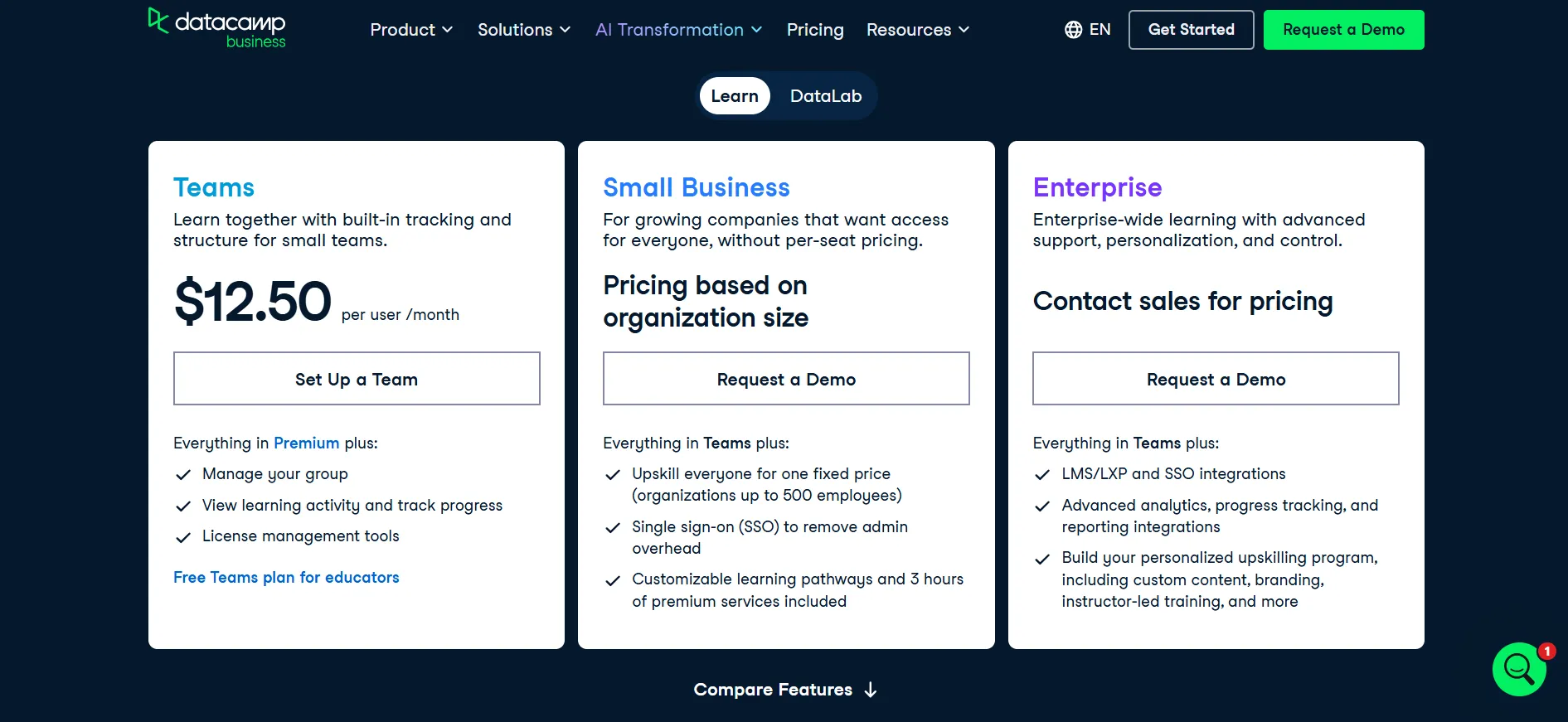
The value appears when compliance rules require single sign-on or when the organization wants custom content that matches internal tools. Quotes vary by headcount and the specific integrations needed, so the final number is only available after a sales conversation.
Eligible students can claim a discounted Premium rate, often more than half off the standard yearly figure. Verification is required. The content matches regular Premium.
Sinh viên nào sử dụng danh mục sách trong một hoặc hai học kỳ thường thấy rõ lợi ích của mức phí thấp hơn. Vui lòng kiểm tra trang dành cho sinh viên để biết các quy định hiện hành về điều kiện được hưởng ưu đãi.
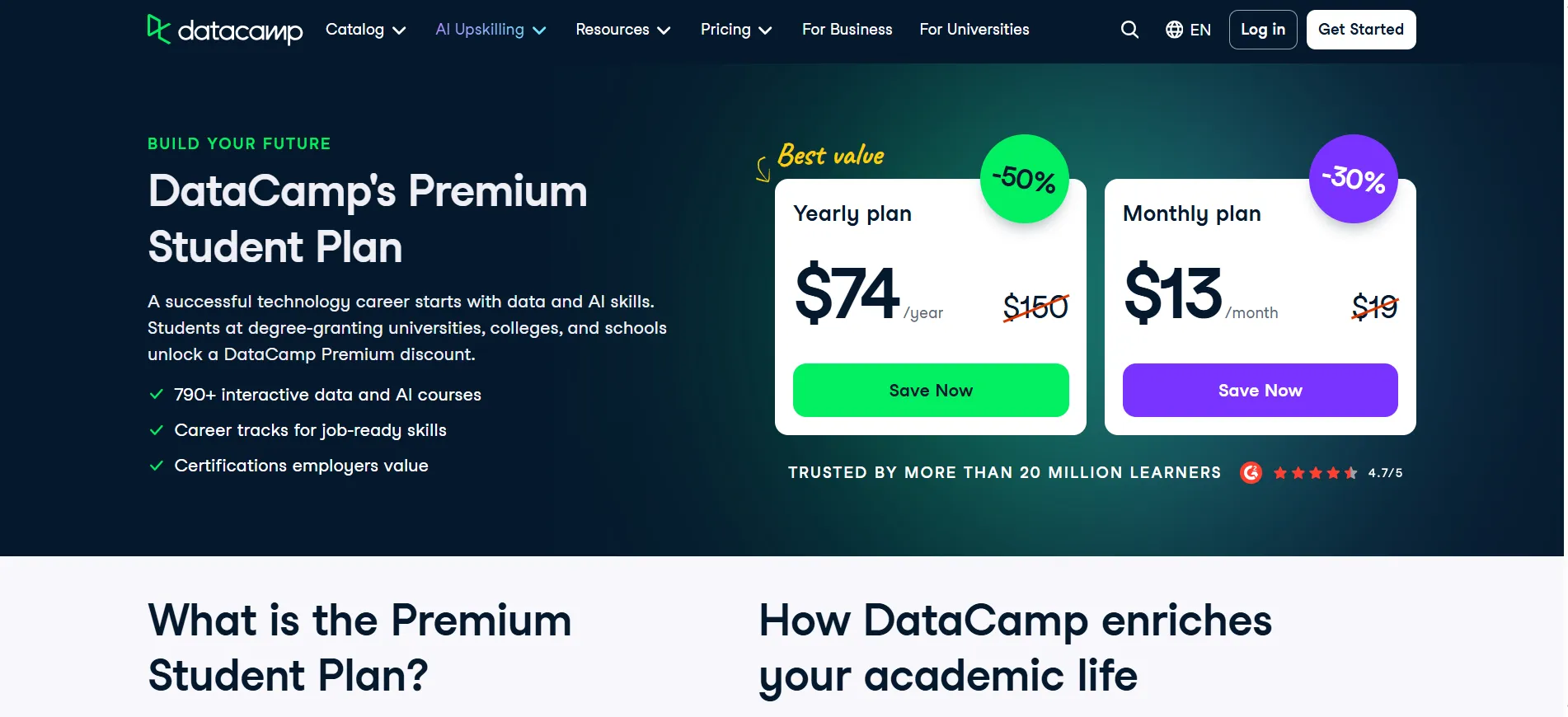
The discount makes the yearly commitment easier for learners who have a fixed study period. Once the student status ends, the account typically moves to the standard Premium rate if the subscription continues.
What Every Plan Shares
All plans open the first chapter of courses, cheat sheets, mobile learning, assessments, live sessions, and competitions. Paid plans add the complete catalog, projects, certificates, career tracks, and priority support. No plan offers permanent free full access.
Yearly billing produces the lower effective monthly number on both Premium and Teams. Monthly options, where offered, cost more per month. Cancellation is available at any time. Yearly plans generally cannot be paused.
Prices can vary by region and promotions appear regularly on the pricing page. The interactive coding environment is available on every plan, but the depth of exercises increases once you pay. Certificates require a paid plan and a completed course.
Career tracks guide you through a sequence of courses aimed at specific roles. These shared pieces mean the main differences are the course completion limits on Basic and the admin tools on Teams and Enterprise.
A Practical Way to Test the Value
Begin on Basic and finish the opening chapters of two or three topics you care about. If the style clicks and you want to complete full courses or collect certificates, move to Premium on yearly billing.
The $13 monthly yearly rate is the number most individual learners end up using when they study consistently. If two or more people need access plus basic tracking, Teams at the same per-user yearly rate is usually cleaner than multiple personal seats.
Enterprise only makes sense when the organization needs the advanced integrations and reporting. Count the courses you realistically expect to finish. Higher completion numbers make the yearly rate look better on a per-course basis.
Low completion numbers favor staying free. Set a calendar reminder before the yearly renewal so you can review whether the completed courses justified the cost. Many learners who start on Basic and move to Premium after two weeks of sampling report that the switch feels natural once the first-chapter limits become obvious.
Factors That Change the Final Number
Yearly billing produces the $13 figure and the $78 saving shown on the page. Promotions can drop the yearly total further for limited periods. Team size multiplies the Teams cost directly.
Enterprise quotes scale with headcount and feature needs. The largest variable is how many courses you actually complete. Steady progress over months usually makes the yearly Premium rate feel reasonable. Sporadic use makes even the lower yearly figure feel expensive.
Regional pricing can shift the exact dollar amount at checkout. Taxes are added separately in some countries. If a promotion is active when you subscribe, confirm whether it applies only to the first year or continues on renewal.
The pricing page updates the displayed rates frequently, so the $13 figure is the one to verify on the day you decide.
Ưu và nhược điểm: Bảng giá DataCamp năm 2026
Ưu điểm
- Gói Cơ bản miễn phí cho phép bạn dùng thử mọi khóa học.
- Toàn bộ thư viện và chứng chỉ được mở khóa trên tài khoản Premium và Teams.
- Yearly billing keeps the monthly rate at $13.
- Sinh viên được hưởng ưu đãi giảm giá dành cho người dùng đủ điều kiện.
- Các công cụ theo dõi nhóm được tích hợp sẵn trên Teams.
Nhược điểm
- Full courses require a paid plan.
- Các gói dịch vụ hàng năm thường không thể tạm dừng.
Hỏi đáp về: Bảng giá DataCamp năm 2026
Mức phí này xứng đáng khi bạn hoàn thành nhiều khóa học và sử dụng các chứng chỉ hoặc lộ trình nghề nghiệp mà chúng mang lại. Nó sẽ ít hữu ích hơn nếu bạn chỉ dừng lại ở các chương đầu tiên.
Basic is free. Premium is $13 a month billed yearly. Teams is $13 per user a month billed yearly. Enterprise is custom. Monthly rates are higher when offered.
Đúng vậy. Gói Cơ bản là miễn phí và mở khóa chương đầu tiên của mọi khóa học. Không có bản dùng thử riêng cho các gói trả phí.
Chứng chỉ có sẵn trên các gói Premium, Teams và Enterprise.
Vâng. Bạn có thể chuyển từ gói Basic sang Premium hoặc Teams bất cứ lúc nào. Gói Enterprise yêu cầu phải có cuộc trao đổi với bộ phận bán hàng.
On yearly billing the rate is fixed for the subscription period. Promotions can change the starting price, so confirm the number at checkout.
Liên kết nhanh:
Final Conclusion: DataCamp Pricing 2026
DataCamp pricing makes a subscription worth considering once you know you will finish more than the opening chapters. Premium at $13 a month on yearly billing is the straightforward choice for most individuals who study steadily.
Teams at the same per-user yearly rate fits small groups that want basic tracking. Enterprise only fits organizations that need the advanced controls. Basic remains free for sampling.
Yearly billing is the lower number compared with monthly options. Use the free chapters to confirm the style, then move to Premium if you plan regular study. Check the pricing page for the exact figures and any current promotions before you subscribe.
For learners who complete a solid number of courses, the yearly Premium rate usually lines up with the value they receive. The platform works best when the learning is consistent rather than occasional.