Otter.ai doesn’t charge per meeting. It charges per minute. And how fast those minutes disappear depends on how long your meetings run, how many files you import, and how many people are on your team.
This is where most people get confused. Otter says “1,200 minutes per month” on the Pro plan.
But what does that actually mean in meetings? How many meetings is that? What happens when you run out? And how do imported files affect your pool?
This guide does the math for you. We break down exactly how Otter’s minute system works, how far each plan goes in practice, and how to ensure you don’t run out mid-month.
Otter.ai Pricing 2026: How Does the Minute System Work?
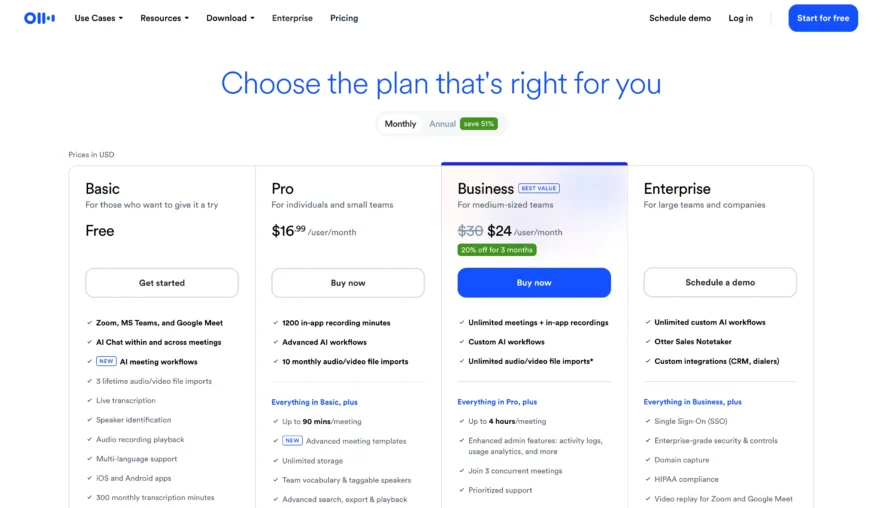
Every Otter.ai plan provides a fixed number of transcription minutes per billing cycle. Those minutes cover two types: live meeting transcriptions and imported-file transcriptions. Both draw from the same pool.
Here’s the current allocation:
| Plan | Monthly Minutes | Max Per Conversation | File Import Limit |
| Basic (Free) | 300 | 30 min | 3 lifetime |
| Pro | 1,200 | 90 min | 10/month |
| Business | 6,000 | 4 hours | Unlimited |
| Enterprise | Unlimited | 4 hours | Unlimited |
Minutes don’t roll over. If you have 400 minutes left at the end of the month, they vanish when the new cycle starts. There’s no credit bank. There’s no rollover pool. Use it or lose it.
The per-conversation cap is separate from your monthly pool. Even if you have 1,000 minutes remaining, a single Pro meeting can’t exceed 90 minutes. Business and Enterprise raise that to 4 hours.
How Many Meetings Does Each Plan Actually Support?
This depends entirely on your average meeting length. Let’s calculate for common durations.
1. Basic (Free) — 300 minutes/month
| Meeting Length | Meetings Per Month | Meetings Per Week |
| 15 min | 20 | 5 |
| 30 min | 10 | 2.5 |
| 45 min | 6.6 | 1.6 |
| 60 min | 5 | 1.25 |
The free plan works for about 2 short meetings per week. The moment you exceed that pace, you run out before the month ends.
And remember — the 30-minute per-conversation cap means your 45-minute meetings get cut off anyway.
2. Pro ($16.99) — 1,200 minutes/month
| Meeting Length | Meetings Per Month | Meetings Per Week |
| 30 min | 40 | 10 |
| 45 min | 26 | 6.5 |
| 60 min | 20 | 5 |
| 90 min | 13 | 3.25 |
Pro comfortably covers 5 one-hour meetings per week. That’s a typical schedule for most professionals. If your schedule is heavier than that, you’ll need Business.
3. Business ($24) — 6,000 minutes/month
| Meeting Length | Meetings Per Month | Meetings Per Week |
| 30 min | 200 | 50 |
| 45 min | 133 | 33 |
| 60 min | 100 | 25 |
| 90 min | 66 | 16.5 |
Business supports a team. If you have 10 team members each attending 5 one-hour meetings per week, that’s 2,000 minutes per month — well within the 6,000 cap.
A team of 20 would use about 4,000 minutes. Business covers most mid-sized teams comfortably.
Enterprise — Unlimited
No caps. No math needed. If your organization has 100+ people and a heavy meeting culture, Enterprise removes the minute constraint entirely.
What Happens When You Run Out?
When your monthly minutes hit zero, Otter stops transcribing. Your next meeting won’t get notes. You can’t import new files. You wait until the billing cycle resets.
There’s no option to buy extra minutes mid-cycle. You can’t top up your pool. Your only choices are to wait for the reset or upgrade your plan.
This makes planning critical. If you’re on Pro and you see your minutes getting low in week 3, you need to prioritize which remaining meetings get transcribed.
Otter doesn’t ration for you. It’s first-come, first-served until the pool is empty.
Real-World Usage Scenarios
Let’s look at how minutes play out for different user types.
Solo freelancer, moderate meetings. You have 4 client calls per week, averaging 45 minutes each. That’s 720 minutes per month. Pro’s 1,200 minutes covers it. You have 480 minutes left for file imports or extra calls. Pro at $8.33/month (annual) works well.
Small team (5 people), mixed schedule. Each person has 4 45-minute meetings per week. That’s 3,600 minutes per month. Pro’s 1,200 minutes doesn’t cut it. Business gives you 6,000 minutes — enough to cover the team with a buffer. Business at $20/user/month (annual) is the right fit.
Sales team (10 people), call-heavy. Each rep has 6 calls per day, averaging 30 minutes. That’s 10 reps × 6 calls × 30 min × 20 work days = 36,000 minutes per month. Business doesn’t come close. Enterprise’s unlimited plan is the only option. Plus, Enterprise unlocks OtterPilot for Sales — CRM sync, call coaching, and sales insights.
Student with lectures. You attend 3 lectures per week, each lasting 60 minutes. That’s 720 minutes per month. Pro covers it. With the .edu discount, you pay $6.67/month on annual billing. That’s less than a coffee per week.
Annual Billing: Same Minutes, Lower Price
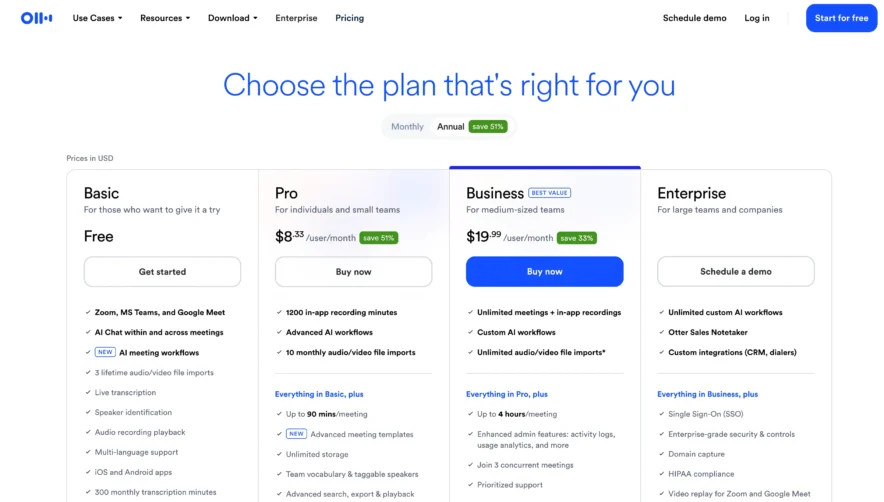
Annual billing doesn’t give you more minutes. But it dramatically lowers what you pay per minute.
| Plan | Monthly Billing Cost | Annual Billing Cost (per month) | Cost Per Minute (Monthly) | Cost Per Minute (Annual) |
| Pro | $16.99 | $8.33 | $0.014 | $0.007 |
| Business | $30 | $19.99 | $0.005 | $0.003 |
On annual Pro billing, you pay less than a penny per transcription minute. On annual Business, it’s a third of a penny. At those rates, transcription costs are essentially invisible in any professional’s budget.
Monthly billing nearly doubles your per-minute cost on Pro. If you’ve been using Otter for a month and know you’ll continue, switch to annual immediately.
The 30-Minute Trap On Free
This deserves its own section because it catches so many people.
Otter’s free plan limits each conversation to 30 minutes. When the timer hits 30:00, transcription stops. The meeting keeps going. Otter does not. There’s no warning at 25 minutes. There’s no option to extend. It just ends.
For professional meetings that typically run 45–60 minutes, this means you lose the last third to half of every conversation. That’s often where decisions are made, action items are assigned, and next steps are confirmed.
Losing that part of the transcript defeats the entire purpose of having an AI notetaker.
If your meetings consistently exceed 30 minutes, upgrading to Pro is not optional. It’s necessary.
Frequently Asked Questions
How do I check my remaining minutes?
Go to Settings in your Otter account. Your usage stats show how many minutes you’ve consumed and how many remain in the current billing cycle.
Can I buy extra minutes if I run out?
No. Otter doesn’t offer minute top-ups. Your options are to wait for the next cycle or upgrade your plan.
Do minutes reset on a calendar month or billing date?
They reset on your billing date. If you subscribed on the 15th, your minutes reset on the 15th of each month.
What counts as a transcription minute?
One minute of audio transcription — whether from a live meeting or an imported file — costs one minute from your pool. If Otter transcribes a 47-minute meeting, that’s 47 minutes consumed.
If two team members attend the same meeting, does it use double the minutes?
No. Otter uses one notetaker bot per meeting. It consumes minutes once, not per attendee.
Also Read:
Bottom Line
Otter’s minute system is simple on the surface, but catches people who don’t plan.
The 300-minute free pool barely covers 2 meetings per week. Pro’s 1,200 minutes handles most solo users. Business’s 6,000 minutes support teams of 5–15 people.
Minutes don’t roll over. There are no top-ups. When they’re gone, they’re gone.
Count your average weekly meetings. Multiply by 4.3 for monthly volume. Multiply by your average meeting length. That number tells you which plan you need. Add a 15–20% buffer for imported files and unexpected meetings. Then choose.
Otter works well when you pick the right plan. It frustrates you when you don’t.