
Kling AI doesn’t charge per video. It charges per credit. And how many credits a video costs depends on what you choose — the mode, the length, the resolution, and whether you add audio.
This confuses a lot of people. Kling’s marketing says “660 credits = 33 videos” on the Standard plan. That’s a best-case number. Your real output will be lower. Sometimes much lower.
This guide shows you exactly how credits work, what each type of video costs, and how to stretch your credits further. Let’s do the math.
Kling AI Pricing 2026: How Does the Credit System Work?
Every Kling AI action costs credits. You get a fixed number of credits based on your plan. Free users get 66 credits per day that don’t roll over. Paid users get a monthly pool of 660 to 26,000 credits, depending on the tier.
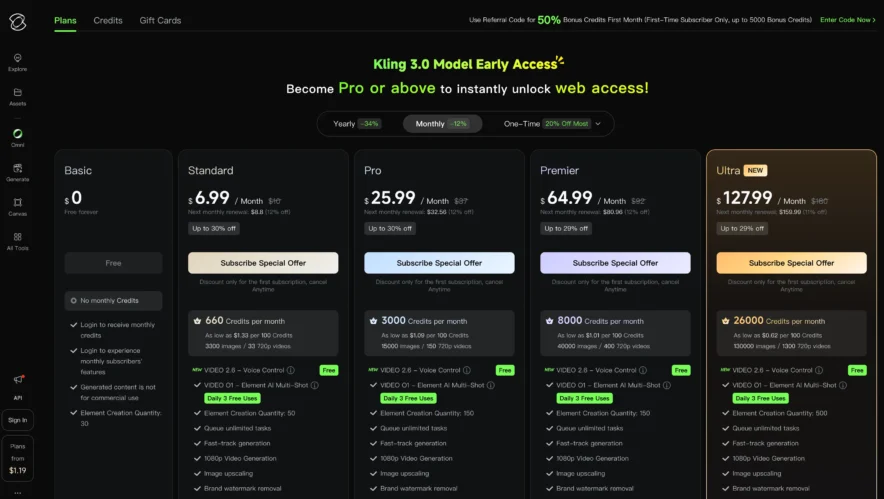
Here’s the current plan structure:
| Plan | Monthly Credits | Monthly Price | Cost per 100 Credits |
| Basic (Free) | 66/day | $0 | Free (limited) |
| Standard | 660 | $6.99 | $1.06 |
| Pro | 3,000 | $25.99 | $0.87 |
| Premier | 8,000 | $64.99 | $0.81 |
| Ultra | 26,000 | $127.99 | $0.49 |
The more credits you buy, the cheaper each credit gets. Ultra users pay less than half per credit compared to Standard users. That’s the volume discount at work.
What Each Video Type Actually Costs?
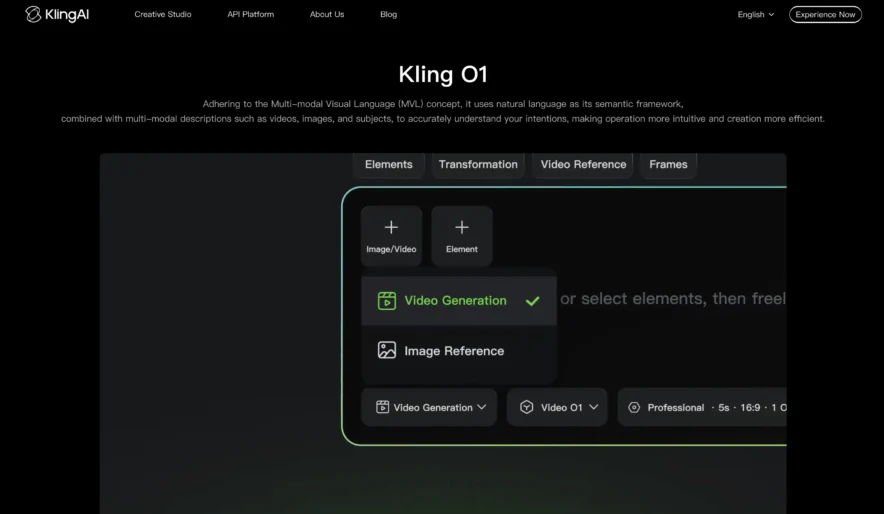
Not all videos are equal in Kling AI. Here’s the credit breakdown by video type based on Kling 2.6 settings:
| Video Type | 5-Second Cost | 10-Second Cost |
| Standard Mode (720p, no audio) | 10 credits | 20 credits |
| Professional Mode (1080p, no audio) | 35 credits | 70 credits |
| Kling 2.6 with Native Audio (Standard) | 50 credits | 100 credits |
| Kling 2.6 with Native Audio (Professional) | ~100 credits | ~200 credits |
Read that last row carefully. A single 10-second Professional mode video with native audio costs 200 credits. On the Standard plan (660 credits), that means you can make just 3 of those videos per month. Three.
The gap between marketing claims and real-world output is massive.
Why Failed Generations Matter?
This is the part most pricing guides skip. When a Kling AI generation fails — stuck at 99%, prompt rejected, unusable output — you still lose the credits. No refund. No credit back.
Users report failure rates of 30–40% on the free tier during peak hours. Paid tiers have better success rates thanks to priority processing, but failures still happen. Complex prompts, crowd scenes, and detailed textures are the biggest failure triggers.
A safe planning approach: add a 20% credit buffer on top of your expected usage. If you think you need 500 credits worth of output, budget 600.
Real Cost Per Video: The Final Math
Here’s what you’re actually paying per finished video on each plan, assuming Professional mode (because that’s what you’ll use):
| Plan | Cost/Month | 5s Prof. Video | 10s Prof. Video | 10s Prof. + Audio |
| Standard | $6.99 | $0.39 | $0.78 | $1.17–$2.33 |
| Pro | $25.99 | $0.31 | $0.62 | $0.87–$1.73 |
| Premier | $64.99 | $0.29 | $0.57 | $0.81–$1.62 |
| Ultra | $127.99 | $0.17 | $0.35 | $0.49–$0.98 |
At the Standard level, a Professional mode video with audio can cost over $2. At Ultra, the same video costs under $1. Volume lowers your per-video cost significantly.
Image Generation: The Hidden Bargain
Kling AI isn’t just video. It generates images too. And images are where credits go furthest. One image costs roughly 0.2 credits based on Kling’s estimate of 3,300 images per 660 credits on the Standard plan.
That means the Standard plan’s 660 credits can produce 3,300 images OR 33 basic videos — but not both. If your workflow mixes images and video, plan your credit split carefully. Use images for concepting and storyboarding. Save video credits for final output.
Annual Billing: The Credit-Cost Optimizer
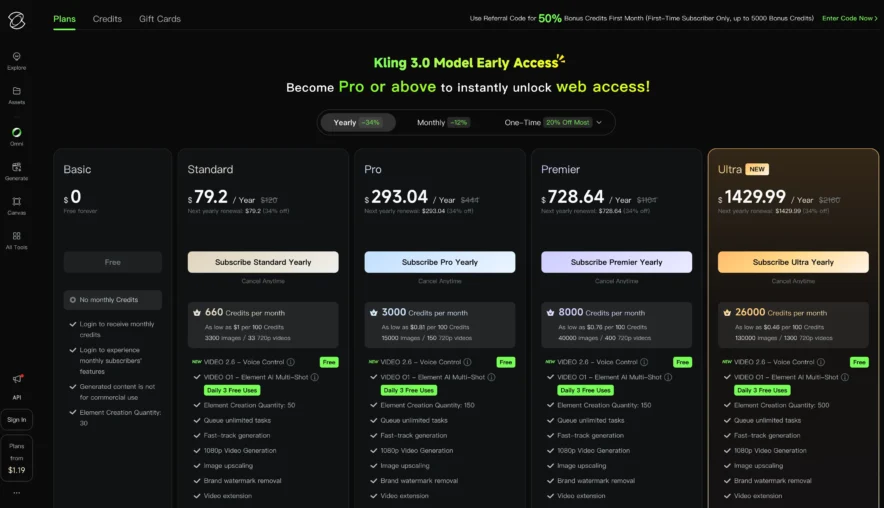
Annual billing doesn’t give you more credits. But it lowers your cost per credit significantly.
| Plan | Monthly Rate (Renewal) | Annual Rate (per month) | Savings | Cost per 100 Credits (Annual) |
| Standard | $8.80 | $6.60 | 25% | $1.00 |
| Pro | $32.56 | $24.42 | 25% | $0.81 |
| Premier | $80.96 | $60.72 | 25% | $0.76 |
| Ultra | $159.99 | $119.16 | 26% | $0.46 |
On Ultra annual, you pay just $0.46 per 100 credits. That’s the absolute best rate Kling AI offers. For studios producing hundreds of videos monthly, that pricing is competitive.
Frequently Asked Questions
How many credits does one Kling AI video cost?
A 5-second basic 720p video costs 10 credits. A 5-second Professional mode video costs 35 credits. A 10-second Professional video with native audio costs 100–200 credits. The exact amount depends on your settings.
Why did I run out of credits so fast?
Most likely because you’re using Professional mode (3.5x base cost), generating longer clips (2x for 10-second vs 5-second), using native audio (3–5x multiplier), or hitting failed generations that consume credits without output.
Can I get credits back for failed videos?
No. Kling does not refund credits for failed, stuck, or unusable generations. Budget a 20% buffer for failures.
What’s the cheapest way to use Kling AI?
Use Standard mode for testing. Switch to Professional mode only for final renders. Skip native audio when possible. Keep clips short. Choose simple compositions over complex scenes. And go annual if you’re committed.
Is the Ultra plan worth it for solo creators?
Rarely. Ultra gives you 26,000 credits per month. Most solo creators use 1,000–5,000. You’d be paying for capacity you don’t need. Standard or Pro covers most individual workflows.
Also Read:
Bottom Line
Kling AI’s credit system rewards users who understand it and penalizes those who don’t. The advertised video counts are optimistic. Real output in Professional mode with audio is 2–5x lower than marketing numbers suggest.
Know your mode. Know your costs. Budget for failures. And pick the plan that matches your actual monthly output — not the output you hope to have.
Start with Standard at $6.99. Track your credit usage for a month. Then upgrade only when the numbers prove you need more.
