WordPress Coupon Code searches can help bloggers, freelancers, business owners, and creators find ways to reduce the cost of building a website.
This guide explains how to find a valid WordPress coupon code, apply it at checkout, compare current plan prices, and avoid common mistakes that can cost you money.
Current WordPress Coupon Code 2026
Find all active and verified WordPress coupon codes for 2026 offering savings on Personal, Premium, Business, and Commerce hosting plans, including percentage discounts, monthly rates, and multi-year billing offers.

Save 75% on 3-Year Subscription: WordPress Premium Plan Coupon Code
Commit to a three-year WordPress.com Premium plan and unlock up to 75% savings with this WordPress coupon code. Add the 3-year Premium plan to your cart and enter this WordPress coupon code at checkout to apply your discount immediately and lock in the lowest rate available.
55% Off at $4/Month: WordPress.com Personal Plan Coupon Code
Save 55% on WordPress.com Personal hosting with this WordPress coupon code and pay just $4 per month on annual billing instead of $9. Lock in 6 GB storage, unlimited pages, posts, users and visitors, a free custom domain for one year, ad-free website experience, AI-powered website builder, premium themes, expert support, and WordPress plugin access to get your site live and growing fast.
55% Off at $8/Month: WordPress.com Premium Plan Coupon Code
Claim 55% off WordPress.com Premium hosting using this WordPress coupon code, reducing your monthly cost to just $8 on annual billing from $18. Get 13 GB storage, unlimited pages, posts, users and visitors, free domain for year one, ad-free hosting, AI website builder, all premium themes, full WordPress plugin library, advanced analytics, PayPal and Stripe payment buttons, video uploads, and priority expert support included.
37% Off at $25/Month: WordPress.com Business Plan Coupon Code
Grab 37% savings on WordPress.com Business hosting with this WordPress coupon code, dropping your cost to $25 monthly on annual billing versus $40. Unlock 50 GB storage, unlimited pages, posts, users and visitors, free domain and business email for one year, all premium themes, 60,000+ WordPress plugins, 24/7 priority support, advanced analytics, AI site assistant, payment buttons, 250 GB VideoPress storage, email marketing for 500 subscribers, $200 advertising credits, daily backups, and developer tools including SFTP, SSH, WP-CLI, Git, and GitHub Deployments.
35% Off at $45/Month: WordPress.com Commerce Plan Coupon Code
Save 35% on WordPress.com Commerce hosting built for online stores using this WordPress coupon code, paying $45 monthly when billed annually versus $70. Get 50 GB storage, unlimited pages, posts, users and visitors, free domain and business email for one year, WooCommerce-ready infrastructure, premium store themes, 60,000+ WordPress plugins, 24/7 priority support, AI site assistant, advanced analytics, payment buttons, 250 GB VideoPress storage, email marketing for 500 subscribers, $200 ad credits, real-time backups, developer tools, and ecommerce features supporting sales across 60+ countries.
How to Apply a WordPress Coupon Code
Follow these simple steps to redeem your WordPress coupon code at checkout and unlock savings on WordPress.com hosting plans. Enter your WordPress coupon code in the discount field during signup, apply it before payment, and watch your total drop instantly.
Step 1: Choose Your WordPress Plan Visit WordPress.com and browse the available hosting plans. Select the tier that matches your needs, whether Personal, Premium, Business, Commerce, or Enterprise.
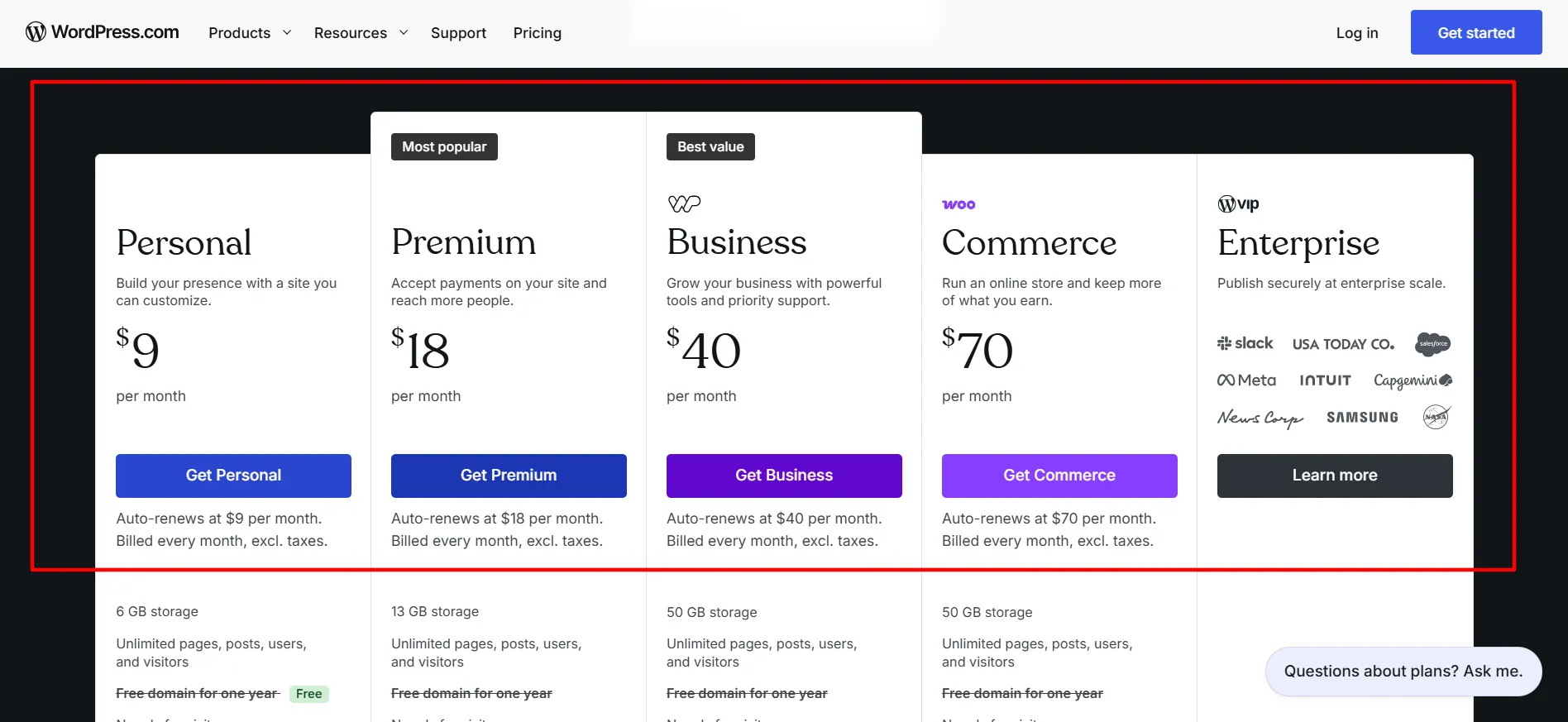
Step 2: Pick Your Billing Cycle Choose your preferred billing period: monthly, annual, or multi-year options to determine your base price before applying any WordPress coupon code.

Step 3: Proceed to Checkout Click through to the checkout page where you’ll enter payment details and finalize your WordPress coupon code redemption.
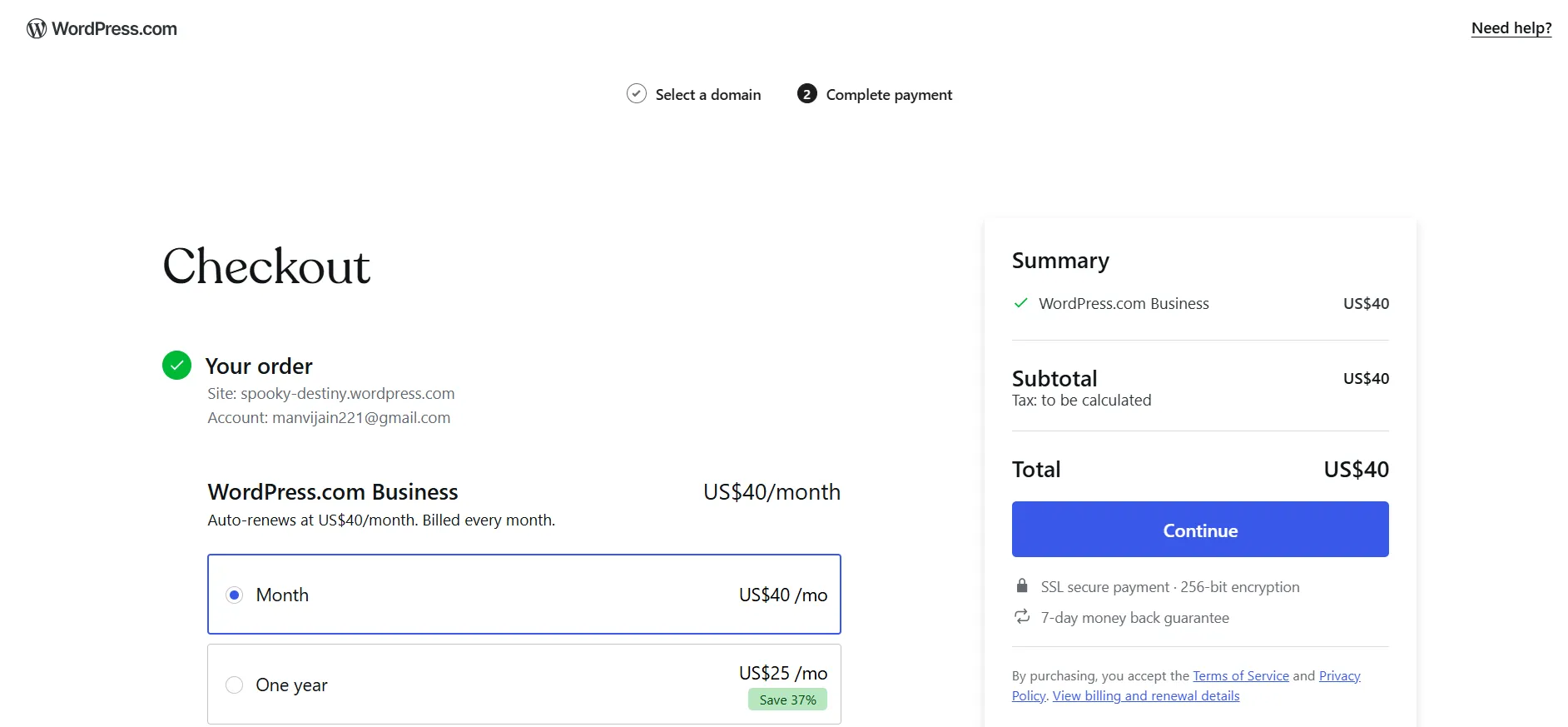
Step 4: Locate the Coupon Field Look for the “Have a coupon?” link positioned below your payment information. Click it to reveal the discount code input field.

Step 5: Enter Your WordPress Coupon Code Type or paste your WordPress coupon code into the field that appears. Double check for typos to ensure the code registers correctly.
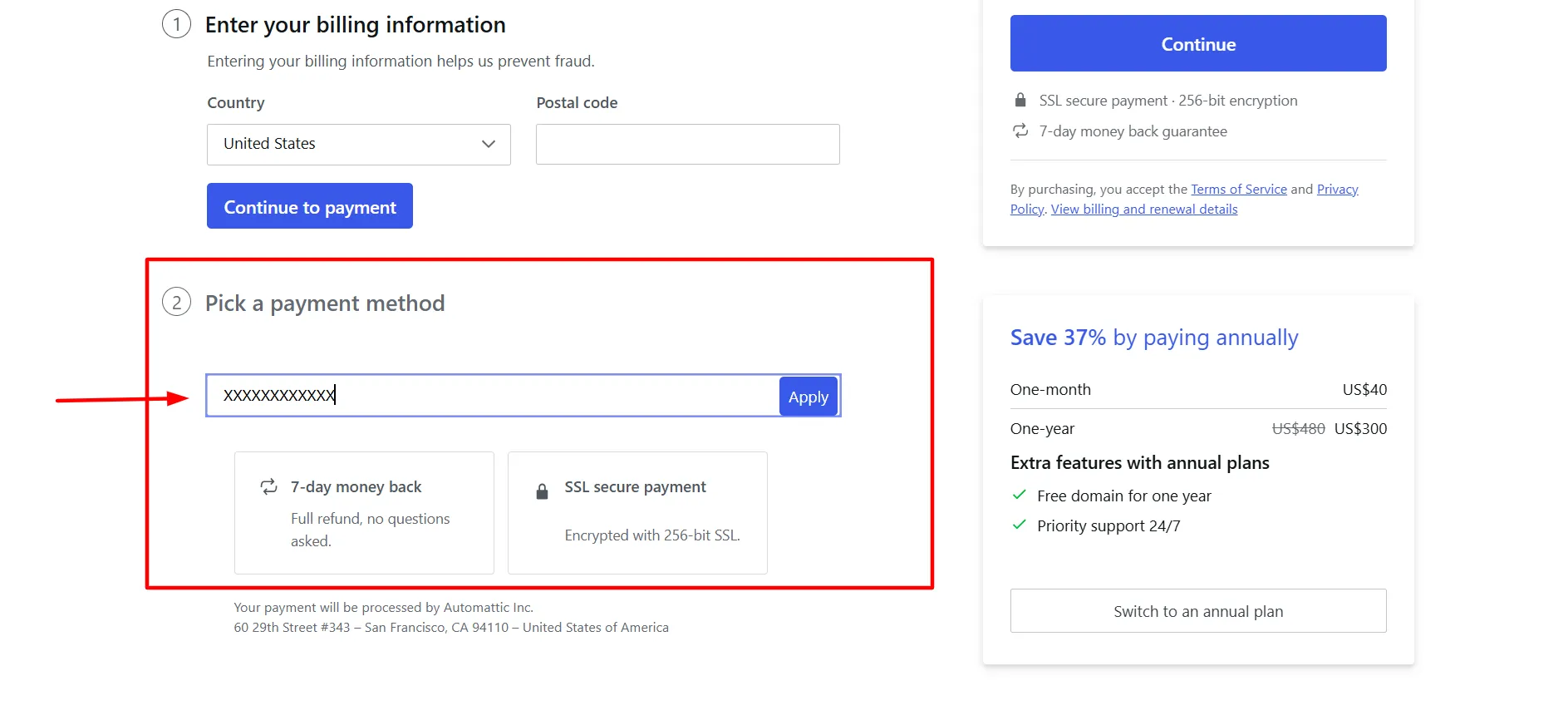
Step 6: Apply and Verify the Discount Click apply to activate your WordPress coupon code. Review the updated total price to confirm the discount has been applied correctly.
Step 7: Complete Your Purchase Finalize your order once you’ve verified the WordPress coupon code savings appear on your invoice. Your new hosting account activates immediately.
WordPress.com says coupon codes are not case-sensitive. A code can also be used for multiple sites under the same account, subject to the campaign’s terms. Official coupon instructions
If your WordPress coupon code does not work, check the expiration date and the products covered by the offer. Make sure you selected an eligible plan and entered the code correctly. If the promotion should still be valid, contact WordPress.com support for help.
Do not complete your purchase assuming a discount will be added later. Confirm the final total before paying.
Current WordPress.com Pricing 2026: Base Rates Before WordPress Coupon Code
Review WordPress.com hosting plan pricing across all tiers including Personal, Premium, Business, Commerce, and Enterprise before applying any WordPress coupon code discount to understand full costs and identify maximum savings opportunities.
Plan | Monthly Billing | Annual Billing | 2-Year Billing | 3-Year Billing |
|---|---|---|---|---|
Free | $0 | $0 | $0 | $0 |
Personal | $9/mo | $4/mo | $3.25/mo | $2.75/mo |
Premium | $18/mo | $8/mo | $6.50/mo | $5.50/mo |
Business | $40/mo | $25/mo | $20/mo | $17.50/mo |
Commerce | $70/mo | $45/mo | $36/mo | $31.50/mo |
Prices reflect the displayed monthly equivalents for each billing term. Check the official checkout page for the exact upfront charge, current promotion, taxes, and renewal rate. Source: WordPress.com Pricing
Which WordPress Plan Should You Choose?
Select the right WordPress.com plan for your needs in this breakdown comparing Personal, Premium, Business, and Commerce tiers, with storage limits, feature inclusions, pricing before WordPress coupon codes, and recommendations for different site types and budgets.
Free:
Suitable for testing the platform or starting a simple personal website. It includes a WordPress.com subdomain and has limits on storage and features.
Personal:
A practical option for personal blogs, portfolios, and small websites that need a custom domain and an ad-free visitor experience. Paid plans include plugin installation, which can help you add features to your website.
Premium:
Suited to creators and bloggers who want more storage, premium themes, advanced site statistics, and tools for accepting payments or publishing videos.
Business:
A fit for businesses and growing websites that need developer tools, more control, and access to advanced site features.
Commerce:
Designed for online stores that need WooCommerce tools, product management, and ecommerce features such as abandoned-cart emails and inventory management.
The right plan depends on what your website needs. Buying a more expensive subscription simply because it has a larger advertised discount will not necessarily save you money if you never use the extra features.
Tips for Saving More on WordPress.com
Use these steps to keep your website costs under control:
Compare the full subscription cost. A plan advertised at a low monthly equivalent may require payment for two or three years upfront.
Choose a plan that matches your needs. A personal blog may not need the ecommerce features included with Commerce.
Enable promotional emails. WordPress.com may send limited-time offers to customers who have enabled promotions.
Check referral eligibility. A qualifying referral credit may reduce the cost of an eligible annual subscription.
Include domain renewal costs. A free domain for the first year does not mean it will remain free forever.
Review renewal pricing. Introductory discounts usually do not apply to later subscription periods.
Verify your coupon at checkout. Confirm the final amount before completing the payment.
These checks can help you compare deals fairly and avoid signing up for a longer subscription than you need.
Does WordPress.com Have a Coupon Code in 2026?
Yes, WordPress.com offers promotional coupon codes during selected campaigns. These offers may apply to website plans and other products, depending on the terms of the promotion.

The company does not publish a single universal code with a guaranteed discount for everyone. A coupon listed on a third-party deal website might be expired, restricted to a particular plan, or unavailable in your country.
Your safest option is to check the official WordPress.com pricing page and look for a promotion sent directly by the company. You can also enable promotional emails in your account to receive eligible offers when they become available.
Before using a WordPress coupon code, check these details:
The promotion’s expiration date.
Which plans or products qualify.
Whether the offer applies to your country or currency.
Whether the discount covers the first subscription period only.
The regular price charged when your plan renews.
WordPress.com confirms that sale coupons apply to eligible new purchases and upgrades, but not to ordinary renewals of existing paid plans. Promotional pricing also does not carry over to later subscription periods.
Get a Free Domain With an Eligible WordPress.com Plan
A custom domain helps give your website a professional address, such as yourwebsite.com. WordPress.com includes a free domain credit for the first year with qualifying annual and multi-year paid plans.
You can use the credit to register an eligible new domain or, under the applicable terms, transfer an existing domain. Monthly subscriptions do not include the same free-domain credit.
Remember that the domain normally renews at its regular price after the first year. Check the renewal fee and domain extension before making your purchase.
If you already own a domain, you may be able to connect it to your website instead of registering a new one. This can help you avoid unnecessary domain costs.
Pros & Cons: WordPress Coupon Code
Pros
- Plugin access starts on the Personal plan at $2.75 monthly on three-year billing, giving you full site customization without forcing upgrades to Business just to add third-party tools and extensions.
- No credit card needed for the free plan, and it never expires, so you can test WordPress.com indefinitely before spending money and decide if it fits your needs.
- Switch between plans anytime with no penalties. Any unused portion of your current plan converts to credit toward your new one, letting you scale without losing money or facing contract locks.
- Every tier includes a free custom domain for year one, AI website builder, unlimited pages and posts, expert customer support, and plugin access, so professional features come standard across all pricing levels.
- The Commerce plan supports online stores with WooCommerce integration, unlimited products, zero transaction fees, and payment processing in 60+ countries, making ecommerce setup simple and cost-effective.
Cons
- The free plan maxes out at 1 GB storage and blocks custom domains, plugins, and ad-free browsing, so it only works for testing ideas rather than running a legitimate business site.
- Advertised WordPress coupon code pricing requires upfront payment for the entire term. Renewal rates jump substantially higher once your initial contract ends, increasing long-term costs.
Do WordPress.com Coupon Codes Work on Renewals?
Generally, no. WordPress.com states that promotional sale coupons are for new purchases, including qualifying plan upgrades. You cannot apply a standard sale coupon to an existing paid plan’s regular renewal.
The discount applies to the first subscription period only. After that period ends, the plan renews at its regular price unless another eligible offer applies.
For example, if you purchase a plan at a promotional rate for one year, you should budget for the standard renewal price when the next billing period begins. You can view your renewal charges through your account’s billing information.
WordPress.com subscriptions are set to renew automatically by default. If you do not want another charge, review your renewal settings before the next billing date.
Refund Policy: WordPress Coupon Code
Before purchasing a subscription with a coupon, read the refund terms. WordPress.com offers a refund period that depends on the product and billing period.
Its published policy generally provides:
Annual and multi-year plans: 14 days.
Monthly plans: 7 days.
100-year plans: 120 days.
Domain registrations and renewals: generally 96 hours.
Specific conditions and product exclusions may apply, so check the official WordPress.com refund policy before paying.
If you purchase a plan and later find a better coupon, do not assume you can automatically cancel and buy again to reuse the same offer. Coupon eligibility and refund availability depend on the campaign rules and your purchase.
FAQs: WordPress Coupon Code
WordPress.com runs limited-time coupon promotions, but it does not publish one permanent code that works for every customer. Check the official pricing page and promotional emails for current offers.
Standard sale coupons cannot be applied to an existing plan's renewal. They may apply to eligible new purchases and upgrades, subject to the promotion's terms.
Yes. WordPress.com offers a free plan with a WordPress.com subdomain and basic website features. Paid plans add features such as custom domains, plugin installation, and ad-free browsing for visitors.
WordPress.com's referral terms state that referral credits cannot be combined with other credits or discounts. Check the current program terms before checkout.
Yes. WordPress.com is a hosted platform, so you do not need to purchase separate web hosting for a WordPress.com website.
Quick Links:
Final Thoughts: WordPress Coupon Code
A WordPress Coupon Code can help lower the upfront cost of a website subscription, but the best savings may come from combining a legitimate promotion with the right billing term and plan.
Start by checking the official WordPress.com pricing page, enabling promotional emails, and reviewing referral eligibility. If you plan to keep your website for several years, compare multi-year billing with annual and monthly payments before deciding.
Most importantly, check the total upfront payment, renewal price, domain costs, and coupon terms. A deal is only useful if the plan fits your website and your budget beyond the first subscription period.
Visit WordPress.com to compare the current plans and check whether an eligible promotion is available for your purchase.