

On this page13 sections
- 01MasterClass Review at a Glance
- 02What Is MasterClass?
- 03MasterClass Main Features
- 04How MasterClass Performs
- 05MasterClass Pricing
- 06MasterClass Support, Devices, and Extras
- 07MasterClass Drawbacks to Know Before You Buy
- 08How to Get the Most From MasterClass
- 09Who Should Use MasterClass?
- 10MasterClass Alternatives
- 11Pros & Cons: MasterClass Review
- 12FAQs: MasterClass Review
- 13Final Verdict: MasterClass Review
- Comments
Is a year of lessons from famous experts worth $120? This MasterClass review looks at the classes, plans, and limits so you can decide if it is worth it for you.

MasterClass is a premium online learning platform with 200+ video classes taught by famous experts and industry leaders in business, cooking, writing, music, sports, and more. Annual membership starts at $120 a year and includes streaming on phone, computer, and TV.
Pros
- Classes taught by famous experts and leaders in their field
- Annual plans start at $120 a year, about $10 a month
- Watch on phone, computer, and TV, with audio only mode
- High production quality with workbooks for many classes
- A 30 day money back guarantee on new memberships
Cons
- Annual billing only, with no monthly plan
- Classes are prerecorded, with no live feedback from instructors
Starting at $10/mo
Get Started with MasterClassMasterClass sells one thing very well: polished lessons from people at the top of their field. You will see what you get on each plan, how the classes feel, and where the value drops off.
By the end, you will know if MasterClass is worth it for your goals. Spoiler: it shines for inspiration, but it is not a substitute for a formal course.
MasterClass Review at a Glance
In this MasterClass review, the short answer is clear. It is worth it for curious learners who enjoy expert stories and practical tips. Plans start at $120 a year, billed annually.
| Item | Detail |
|---|---|
| Best for | Curious learners, hobbyists, and creative professionals |
| Starting price | $120 a year on the Standard plan, about $10 a month |
| Billing | Annual only, with auto renewal |
| Money back | A 30 day money back guarantee |
| Main drawback | No live instruction or personal feedback |
What Is MasterClass?
This MasterClass review starts with the simple idea. MasterClass is a streaming platform for video classes taught by well known experts in their fields. One membership opens the whole library.
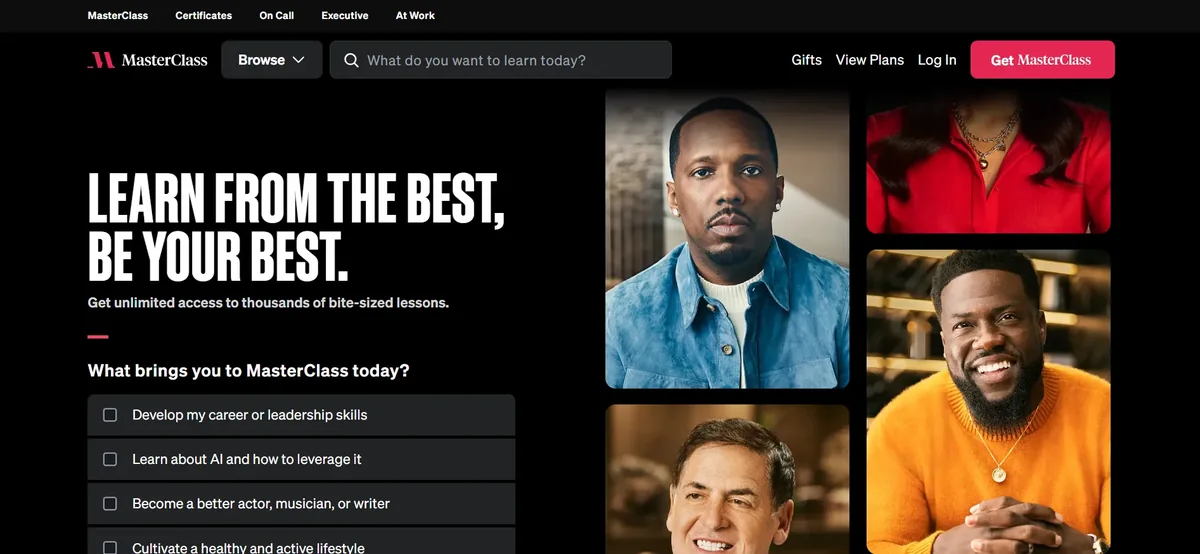
The library holds 200+ classes, and new classes arrive every month. Topics include business, cooking, writing, music, sports, design, and wellness.
Each class is split into short lessons, so you can watch a few minutes at a time. Many classes include a downloadable workbook.
You can watch on a computer, a phone, or a TV. Your progress follows you across every device.
MasterClass Main Features
This MasterClass review covers six features you will use most. They decide how much value you get from a membership. Here is what each one does.
1. Class Library
The full library of 200+ classes comes with every plan. You can jump between topics as often as you like.
New classes are added every month. That keeps the catalog fresh for a full year of membership.
2. Sessions
Sessions are structured programs that guide you through a skill step by step. They feel closer to a course than a regular class.
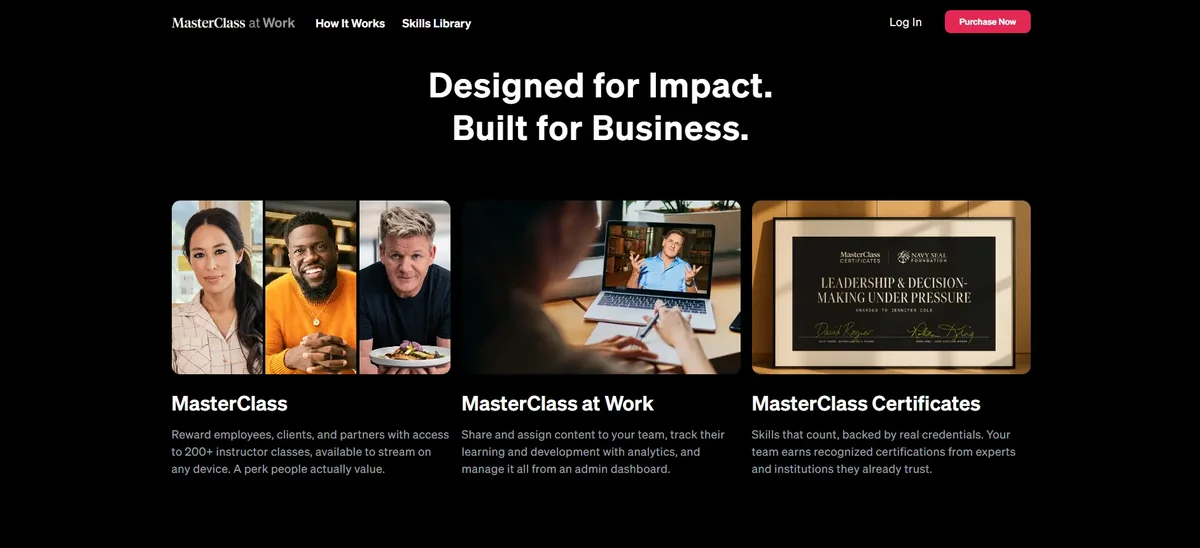
Sessions suit people who want a plan, not just inspiration. Check which Sessions are available before you buy.
3. Audio Only Mode
Many lessons work in audio only mode. You can listen during a commute or a workout, like a podcast.
This makes it easier to finish classes on busy days. Talks on business and writing work especially well this way.
4. Offline Downloads
Plus and Premium let you download lessons for offline viewing on mobile. Standard needs an internet connection.
Downloads help on flights and trips, or anywhere with a weak signal. If you travel often, skip Standard and start with Plus.
5. Devices and Profiles
Standard streams on 1 device at a time. Plus streams on 2 devices, and Premium streams on 6.
Plus and Premium also support up to 6 profiles. Each person keeps their own progress and picks.
6. Workbooks and Extras
Many classes include PDF workbooks with notes, exercises, and recipes. They help you put a lesson into practice.
A Learning Toolkit add on and separate products like Certificates and Executive programs exist for deeper study. They are not part of the standard membership.
How MasterClass Performs
This MasterClass review rates the viewing experience highly. Video and sound quality feel like a documentary. The real question is how much you learn from it.
1. Lesson Quality
Lessons are well shot, short, and easy to follow. Instructors share personal stories along with practical tips.
The tone is more inspiring than technical. You get a mindset and habits, not a step by step syllabus.
2. Learning Results
Hobby topics like cooking and writing give quick, practical wins. Workbooks add exercises that make the lessons stick.
Career skills are a weaker fit. There are no graded tasks, exams, or instructor feedback. You need to set your own practice goals to see real progress.
3. App and Viewing
The apps on phone, computer, and TV are clean and simple. Search and category pages make classes easy to find, and each class page lists its lessons and total run time before you press play.
Progress syncs between devices, so you can start on TV and finish on your phone. Lessons pick up right where you left off.
4. MasterClass Review Scorecard
Here are the scores behind this MasterClass review.
| Category | Rating |
|---|---|
| Class quality | 9 / 10 |
| Ease of use | 9 / 10 |
| Practical depth | 7 / 10 |
| Value for money | 8 / 10 |
| Overall | 8.5 / 10 |
MasterClass Pricing
This MasterClass review keeps pricing simple. There are three plans, all billed once a year. Every plan includes the full class library.
| Plan | Price per year | About per month | Main extras |
|---|---|---|---|
| Standard | $120 | $10 | 1 device, no offline downloads |
| Plus | $180 | $15 | 2 devices, offline downloads, up to 6 profiles |
| Premium | $240 | $20 | 6 devices, offline downloads, up to 6 profiles |
Standard is enough for one person who streams at home. Plus is the sweet spot for travelers or couples, and Premium suits a family that shares one account.
Memberships renew automatically, and MasterClass sends a reminder 30 days before renewal. Prices shown at signup can vary, so check the final amount on the plans page.
A current MasterClass discount offer can lower the first year. You can also try MasterClass risk free with the 30 day money back guarantee.
MasterClass Support, Devices, and Extras
MasterClass keeps support simple and self serve. This MasterClass review checks help options, devices, and extras. Most questions are answered in the help center.
The help center covers billing, devices, and account settings. You can also contact the support team through the help center when you need more.
- Devices: Computer, phone, tablet, and TV apps, with progress synced across them.
- Offline: Downloads for offline viewing on Plus and Premium.
- Sharing: Up to 6 profiles on Plus and Premium.
- Renewal: Auto renewal with a reminder 30 days before the charge.
Want a full plan breakdown? The MasterClass plan costs guide compares each plan side by side.
MasterClass Drawbacks to Know Before You Buy
This MasterClass review flags three drawbacks worth knowing. None are deal breakers, but each affects value. Read them before you pay for a year.
1. Annual Billing Only
There is no monthly plan. You pay for a full year upfront.
The 30 day money back guarantee lowers the risk. After that, the full year is yours whether you watch or not.
2. No Live Feedback
All lessons are prerecorded. You cannot ask an instructor a question or get your work reviewed.
If you need feedback, a course platform with mentors or graded projects fits better. Some learners use both, with MasterClass for ideas and a course for structure.
3. Inspiration Over Depth
Many classes focus on stories and mindset. Advanced learners may want more technical detail.
This MasterClass review suggests treating it as a source of ideas. Pair it with hands on practice for real skill gains.
How to Get the Most From MasterClass
A membership pays off only if you watch and practice. These habits help you turn a year of classes into real progress. Each one takes little time.
1. Pick Two or Three Goals
Choose a few topics before you start, like cooking at home or writing better emails. A short list keeps you from browsing without finishing anything.
Finish one class before you start the next. Short lessons make it easy to complete a full class in a week or two.
2. Use the Workbooks
Download the workbook when a class offers one. Work through the exercises right after each lesson while the ideas are fresh.
Keep notes in one place, such as a simple document or notebook. Reviewing them later helps the lessons stick.
3. Fit Lessons Into Daily Life
Use audio only mode during walks, chores, or a commute. On Plus or Premium, download lessons before a trip.
Set a small weekly target, such as three lessons. Small steady habits beat long weekend binges for most people.
4. Review Before Renewal
MasterClass reminds you 30 days before your plan renews. Use that reminder to check how often you watched during the year.
If you barely used it, cancel auto renewal in your account settings. If you used it often, renewing is an easy call.
Who Should Use MasterClass?
MasterClass suits people who love learning from the best for fun or motivation. It is a weaker fit for anyone chasing a certificate or job skill. This MasterClass review splits the two groups below.
Use MasterClass if you are:
- A curious learner who enjoys many topics. One plan covers the whole library.
- A hobbyist in cooking, writing, or music. Workbooks make the lessons practical.
- A family that shares a screen. Premium supports up to 6 profiles.
Skip MasterClass if you are:
- Seeking a recognized certificate. A course platform fits better.
- Needing instructor feedback. Lessons are prerecorded.
- Unwilling to pay for a full year. There is no monthly plan.
MasterClass Alternatives
This MasterClass review names three rivals that learners compare most. Each one wins in a different area. Here is how they differ.
- Coursera: University style courses with graded work and certificates.
- Skillshare: Project based creative classes from working creators.
- Udemy: A huge catalog of single courses you buy one at a time.
Pros & Cons: MasterClass Review
Pros
- Classes from famous experts in their fields
- Polished video with workbooks for many classes
- Full library on every plan
- Audio only mode and multi device apps
- A 30 day money back guarantee
Cons
- Annual billing only
- No live feedback or graded work
FAQs: MasterClass Review
Yes, if you enjoy expert stories and practical tips across many topics. This MasterClass review finds it less useful for career certificates.
Standard is $120 a year, Plus is $180, and Premium is $240. All plans are billed annually.
No. Memberships are billed once a year and renew automatically.
Yes. New memberships come with a 30 day money back guarantee.
Pros are expert instructors, polished video, and the full library on every plan. Cons are annual billing and no live feedback.
Yes, on Plus and Premium. Standard requires an internet connection.
Standard streams on 1 device, Plus on 2, and Premium on 6 at the same time.
Quick Links:
Final Verdict: MasterClass Review
MasterClass Review verdict: MasterClass is worth it for curious learners who want inspiration from the best in their field. Its polished classes and simple apps make learning feel easy and fun.
The full library comes with every plan, and new classes arrive every month. Audio only mode and offline downloads make it easy to fit lessons into busy days.
The limits are clear. There is no monthly plan, no live feedback, and no recognized certificate in the standard membership.
Pick Standard if you watch alone at home, or Plus if you travel. Premium makes sense for a family sharing one account.
Best for curious learners and hobbyists who want expert ideas at about $10 a month.
Anyone who needs graded work or a certificate should look at a course platform instead.
Last updated

Affiliate disclosure: In full transparency – some of the links on our website are affiliate links, if you use them to make a purchase we will earn a commission at no additional cost for you (none whatsoever!).
Discussion
Join the conversation
No comments yet. Start the discussion with a question or your own experience.